Sold out

Loading product…
Item DC-2988
Sold out
Ultimate Wi-Fi Speed – AC1900 (600Mpbs on 2.4GHz band or 1300Mbps on 5GHz band) wireless speed with the next generation Wi-Fi - 802.11ac*
Dual-Band Wireless – 2.4GHz and 5GHz band for flexible connectivity
Ultimate Range – High gain antennas ensure superior range and stability
Beamforming Technology – Delivers a more targeted and highly efficient wireless connections
Super Speed USB 3.0 Port - Up to 10x faster than USB 2.0**
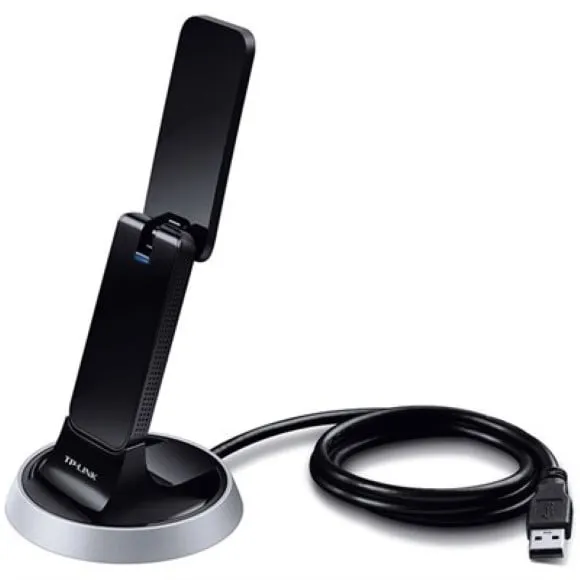
Flexible Deployment - Equipped with a USB 3.0 Cradle for flexible deployment
WPS Button - Easy wireless security encryption at a push of the WPS button
Backward Compatibility – With support for 802.11 a/b/g/n standards***
The Archer T9UH lets your PC or laptop fully utilise the high-speed Wi-Fi created by AC1900 dual-band routers. Enjoy connections 3x faster than Wireless N with Wireless AC technology.
The Archer T9UH supports dual-band Wi-Fi—use the 5GHz band for lag-free gaming and HD streaming, and the 2.4GHz band for video calls and shopping online.
With four high-gain antennas, the Archer T9UH creates a stable Wi-Fi connection across your home, even when your router is on a different floor.
The Archer T9UH supports beamforming, helping create stronger connections with beamforming-capable routers for higher speeds across greater distances.
A 3ft. USB 3.0 cable makes it easy to find a spot for the Archer T9UH in your workspace, and the adapter can be effortlessly attached and removed from your computer as needed.
The Archer T9UH works with a number of operating systems, including Windows XP/7/8/8.1/10, OS X (10.7–10.10), and Linux, making it the perfect choice for nearly all laptops and PCs.
*Maximum wireless transmission rates are the physical rates derived from IEEE Standard 802.11 specifications. Range and coverage specifications are based upon test results under normal usage conditions. Actual wireless transmission rate and wireless coverage are not guaranteed and will vary as a result of 1) environmental factors, including building materials, physical objects and obstacles, 2) network conditions, including local interference, volume and density of traffic, product location, network complexity, and network overhead and 3) client limitations, including rated performance, location, connection quality, and client condition.
**Numbers are based on testing conducted by the USB-IF and your computers are required to also support USB 3.0
***To ensure compatibility, you may need to update the adapter’s drivers after an OS update. You can find our latest drivers in the download centre at tp-link.com/en/download-center.
No reviews yet. Bought it? Tell others what you think.